


DepthX - Live Clock Wallpapers
4.199.00 Reviews
App Specs
- Version
- 1.4
- Updated On
- License
- Free
- Downloads
- 1,000,000+
- Developer
- AppsLab Co.
- Categories
- Personalization
- Platform
- Android
Screenshots
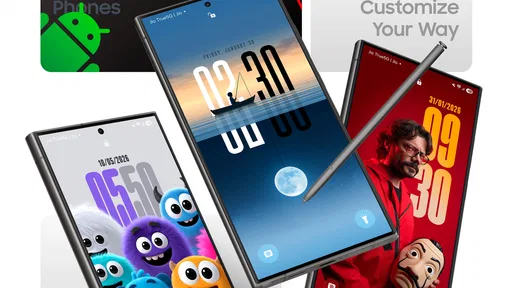

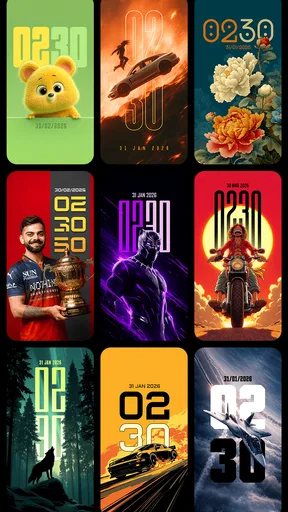

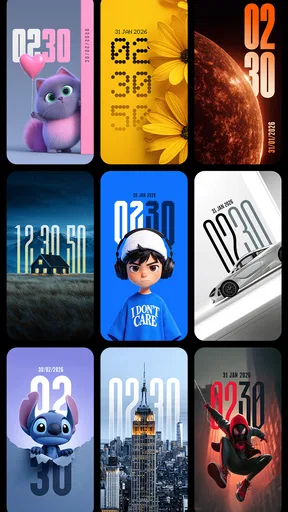
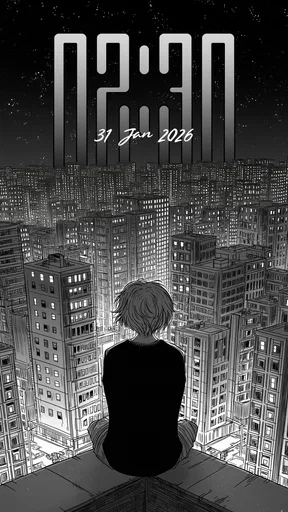
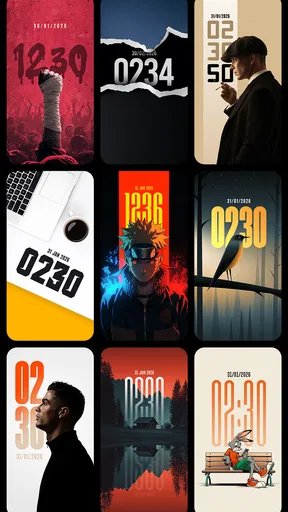
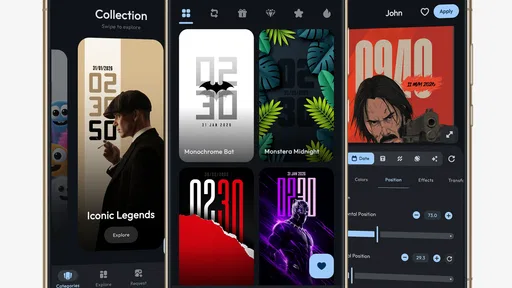
 Analysis by AppCompare
On a shared household phone, a wallpaper is more than decoration: it becomes part of the screen several people glance at during the day. I like the idea of giving that familiar display a more personal look while keeping the time easy to spot. DepthX - Live Clock Wallpapers is a free personalization app from AppsLab Co. built around that combination. Its appeal is clearest when you want the clock and background to feel like one design rather than two unrelated layers.
A shared screen that still feels considered
Think of a phone that sits on a kitchen counter while someone checks the time before leaving, then another person picks it up later to look at a message. A wallpaper with a visible clock can make those quick glances feel more intentional, especially if the household prefers a distinctive screen over a plain image. It is a small visual change, not a way to coordinate family schedules or manage who uses the device.
That distinction matters if several people use one phone. I would treat the wallpaper as a shared choice: pick a design that remains readable to everyone, rather than one that looks great only to the person holding the device close. A bright image can be striking in isolation but make the clock harder to read at a glance. Checking the result on the actual lock or home screen before settling on it is a sensible final step.
Set it up for the person who uses the phone most
The useful customization is not only about choosing a style. Adjusting the clock’s position, size, and color gives you a way to make the display work with the background and with the phone’s usual layout. I’d start with legibility: place the clock where it does not compete with the wallpaper’s busiest area, then choose a color that stands apart without turning the whole screen into a visual distraction.
On a shared device, this is also a practical boundary. The wallpaper can be a household-wide choice, while accounts, messages, and other personal information should remain governed by the phone’s own user and privacy settings. DepthX is for changing the screen’s appearance; it should not be mistaken for a shared-account tool, parental control, or a way to keep individual users’ content separate.
A useful workflow is to try a design during an ordinary day rather than judge it only in the app’s preview. Check whether the clock is easy to notice at the times you usually glance at the phone, and whether the motion feels comfortable when you are trying to focus. If the design draws your eye more than the time does, changing its placement or choosing a calmer option may improve the experience more than picking an even brighter wallpaper.
What the live clock adds—and what it doesn’t
Compared with a static wallpaper, a live design can make the screen feel less like a fixed picture, while the integrated clock gives the visual treatment a practical purpose. Compared with a standard clock widget over a separate background, the combined approach may look more unified. The trade-off is that people who like to rearrange widgets or keep a very clean screen may prefer the flexibility of choosing those elements separately.
Worth Reading Before You Choose

EA SPORTS FC Mobile 26 Is a Bigger Football Game, but It Takes Time

Flipboard Shows What News Apps Must Do Beyond the Feed

Switching to Android Auto Means Rethinking Your Driving Routine

Google Calendar Makes a Crowded Week Easier to Manage

Ludo King Makes the Most of the Minutes Between Plans

Baby Panda World Brings Quick Play to Modern Phones, but Its Game Library Feels Busy
Nor would I choose a clock wallpaper as a replacement for checking the time in every situation. A glanceable display is handy when the phone is already nearby, but it does not replace alarms, calendar reminders, or a dedicated clock when those are what you need. Think of DepthX as a way to style the screen you already look at, not as a new planning system.
Live effects are another matter of taste. Some people enjoy a screen with movement; others would rather have a quiet image that does not pull attention during work or study. If you are sensitive to animation, try the effect in the setting where you use the phone most. The best design is not necessarily the most elaborate one; it is the one you can live with after the novelty wears off.
Age, trust, and household expectations
The app is rated for Everyone, which makes its general audience broad, but that does not mean every household member will want the same look or use the phone in the same way. I would let the person responsible for the shared device choose the final wallpaper, and ask younger users what they find readable and comfortable. That keeps a visual preference from becoming a confusing argument about who changed the phone.
DepthX has an average rating of 4.3 from around 829 ratings, with 50 written reviews, and more than 100,000 installs. Those figures suggest that it has attracted a meaningful audience, but they cannot tell you whether its designs suit your taste or how it will feel on your particular screen. I’d use them as context, not as a substitute for trying a wallpaper yourself.
The app is free to download, with optional in-app purchases ranging from $0.99 to $39.99 per item. I would look at the available choices before treating any particular design or customization as included. If you only want to test whether a live clock wallpaper fits your routine, start with what is available without paying and decide afterward whether an extra purchase is worthwhile. That is especially sensible on a shared phone, where one person’s purchase may not match everyone else’s preference.
Who will enjoy it, and who may prefer another approach
I can see DepthX working well for someone who checks the phone frequently, enjoys changing its appearance, and wants the clock to feel integrated into the wallpaper. It may also suit a household that agrees on a single look for a shared device. Someone who values a plain background, avoids animated visuals, or wants fine-grained control over separate widgets may be happier with a static wallpaper and the phone’s built-in clock options.
For a work phone or a device used in a busy family space, readability should come before novelty. Try a quieter design and a high-contrast clock, then see whether it remains useful under the lighting where the phone is normally kept. If the display becomes cluttered or distracting, returning to a static image is a reasonable choice rather than a failure to use the app properly.
There is also a version and compatibility point worth checking before installing: DepthX is currently at version 1.1 and requires Android 7.0 or later. If you are setting it up on an older Android phone, check that requirement first. The app’s store details describe it as an Android app, so I would not assume that the same experience is available on iOS.
What Makes DepthX Tick?
Right off the bat, DepthX caught my attention with its unique approach to combining aesthetics with practicality. Imagine having a wallpaper that not only looks stunning but also gives you the time at a glance. Yep, that’s what this app does. It’s like having a fancy watch, but on your phone screen.
Design and Customization Galore
The first thing you’ll notice is the sheer variety of designs available. Whether you’re into minimalist styles or something more vibrant, DepthX has got you covered. The app offers a wide range of live wallpapers that are not only visually appealing but also come with an integrated clock feature.
Customizing these wallpapers is a breeze. You can tweak the clock's position, size, and color to match your style. It’s like having a personal designer for your phone screen! Plus, the live wallpaper aspect means the designs have this dynamic feel that static images just can’t compete with.
User Experience: Smooth Sailing
Installing and setting up DepthX is straightforward. The interface is intuitive, so even if you’re not tech-savvy, you’ll find it easy to navigate. After downloading the app, it guides you through the process of selecting and customizing your wallpaper.
Once set, the live wallpapers don’t seem to drain the battery significantly, which is a big win in my book. I’ve had apps in the past that looked great but turned my phone into a portable heater. Thankfully, DepthX isn’t one of them.
Performance and Reliability
Using DepthX - Live Clock Wallpapers over the past week has been a smooth experience. The wallpapers transition seamlessly, and the clock updates in real-time without any noticeable lag. It’s these little things that add up to make a big difference in day-to-day use.
One thing I did notice is how well the app integrates with different devices. I’ve tried it on both Android and iOS, and the performance is consistently reliable. It’s clear the developers put a lot of thought into creating an app that works well across the board.
Why You Should Give It a Shot
If you're looking to spice up your phone's home screen with something that's both functional and aesthetically pleasing, DepthX - Live Clock Wallpapers is definitely worth a try. It’s not just about having a pretty screen; it’s about enhancing your overall phone experience.
The app’s ability to combine style with efficiency sets it apart from other wallpaper apps. It’s like having the best of both worlds right in your pocket.
So, if you’re ready to give your phone a fresh look while keeping track of time in style, head over to your app store and check out DepthX. Trust me, your phone will thank you for it!
Pros
- Stunning live clock wallpapers enhance home screen.
- Customizable clock styles suit personal aesthetics.
- Battery-efficient design for live wallpapers.
- User-friendly interface with intuitive navigation.
- Regular updates with new wallpaper designs.
Cons
- Limited free wallpaper options available.
- Occasional lag on older devices.
- Ads can be intrusive in free version.
- Requires internet for downloading new designs.
- No widgets for quick access to settings.
FAQs for DepthX - Live Clock Wallpapers
What is DepthX - Live Clock Wallpapers?
DepthX - Live Clock Wallpapers is a dynamic app designed to enhance your device with customizable live clock wallpapers. It offers a variety of styles and features that allow you to personalize the look of your home screen, ensuring that your device is not only functional but also visually appealing.
How does DepthX affect battery life?
While DepthX offers stunning live wallpapers, it's important to consider its impact on battery life. Live wallpapers can consume more power than static ones, but DepthX is optimized to minimize battery usage. It includes settings to adjust the refresh rate, allowing users to balance performance and battery consumption.
Does DepthX offer customization options?
Yes, DepthX provides extensive customization options. Users can choose from a range of clock styles, colors, and backgrounds. The app also allows for the adjustment of animation speeds and widget placement, ensuring that users can create a unique and personalized home screen experience.
Is DepthX compatible with all devices?
DepthX is designed to be compatible with most Android and iOS devices, but performance may vary based on your device's specifications. It's always a good idea to check the app requirements in the app store to ensure compatibility with your specific device model and operating system version.
Are there in-app purchases or ads in DepthX?
DepthX offers both free and premium versions. The free version includes basic features and may contain ads. To unlock additional features and remove ads, users can opt for in-app purchases. This allows for a more enhanced and uninterrupted user experience, with more customization options available.


